Self-service customer service
Customer self-service, built from real questions
Self-service lets customers find answers without writing to your team. FAQ pages, knowledge bases and chatbots cover the questions you planned for. A customer Q&A forum catches the ones you did not.
7 days free. No card needed.
Definition
What self-service customer service is
Self-service customer service means customers solve a problem on their own. They search, read an answer and move on. Nobody on your team has to reply.
Done well, it is faster for everyone. Many questions have a short, known answer. A customer who can find it in a minute is happier than one who waits a day for an email.
Self-service works best for questions that many customers share. Think "How do I reset my password?" or "Can I pay by invoice?" Questions about one person's account still need a person. Your help desk handles those.
Every self-service channel has the same weak spot. It only helps if the answer is already there. So the real work is finding which answers are missing, and adding them before the next person asks.
The common channels are an FAQ page, a knowledge base, a chatbot and a public Q&A forum. Most support teams use two or three together.
Channels
Four self-service channels, side by side
| Feature | FAQ page | Knowledge base | Chatbot | Public Q&A forum |
|---|---|---|---|---|
| Who writes it | Your team | Your team | Built from your existing content | Customers ask, your team answers |
| Can customers ask something new | No | No | Yes, but it can only use what it was given | Yes, and the answer is kept |
| Found in Google | Yes, as one page | Yes, page by page | No | Yes, one page per question |
| Good for | The ten most common questions | Long guides and setup steps | Quick replies at any hour | Questions you did not think to write about |
| Watch out for | Goes stale and gets long | Covers what you planned, not what people ask | Can be wrong when the content is thin | Needs your team to answer quickly at first |
Find the gaps
See what customers search for and do not find
Your dashboard lists every search that came back empty. Each line is a question a customer had and could not answer alone. That list is your writing plan for the week.
The same page shows views per question and how many questions, replies and solutions came in over time.
What forum analytics show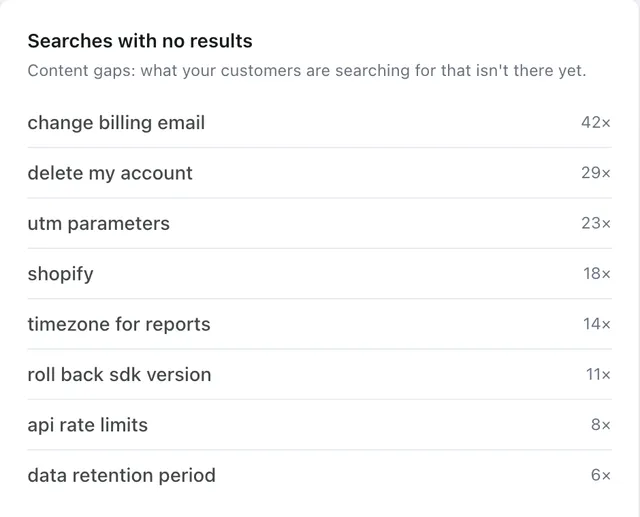
Close the gap
Search first, then ask in the same place
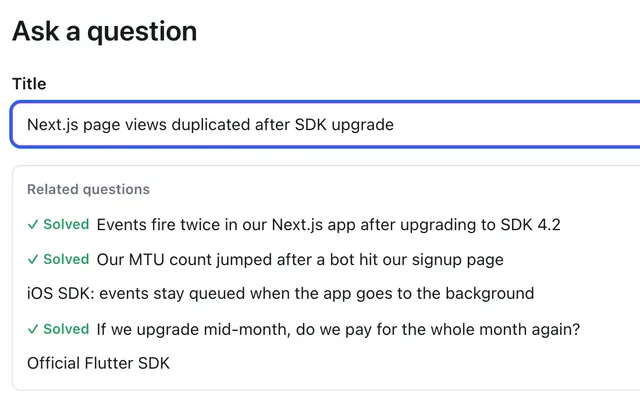
When a search finds nothing, an "Ask a question" button shows right there. The customer does not have to hunt for a contact form.
Your team answers once, in public. The next customer who searches those words finds the answer, so a gap closes for good.

Where to link
Put the link where customers already get stuck
Self-service only helps if people see it. Add the forum link in the places customers go before they write to you.
- Your help desk reply templates, with a link to the exact answer
- The help menu inside your app
- Your site header and footer
- Welcome and onboarding emails
Where this channel stops
Forumcat is not a help desk, and it has no chatbot. No AI writes answers. Keep your help desk for private, one-to-one cases.
There is no importer, so content from your old FAQ or knowledge base stays where it is. Post the top questions by hand to start.
FAQ
Self-service questions we get
Which self-service channel should we start with?
Start where your repeat questions are. If you get the same ten questions, an FAQ page or a forum covers them fast. If people need long setup steps, write those as guides in a knowledge base.
Will self-service annoy customers who want a person?
Not if the way to reach a person stays easy to find. Self-service should be the fast path, not a wall. Keep your contact link next to the forum.
Can we run a chatbot and a Q&A forum together?
Yes. A chatbot answers from the content you give it. A public forum adds real answers for it to read. Each question on the forum is also a plain text file, which AI tools read easily.
How do we know self-service is working?
Watch two things. Views on your answered questions show answers being used. The list of searches with no results shows what is still missing. Our ticket deflection page explains the math.
Does setting this up need a big project?
No. You can name the forum, post your top questions and answer them in one afternoon.
Go deeper
- PillarCustomer support portal
The branded, public pages customers see on your domain.
- Use caseDeflection rate
How to measure what self-service saves your team.
- PillarCustomer Q&A software
The full product, from the ask form to the API.
- PillarHosted support forum
For teams that want the forum format customers know.
- PillarHelp center software
Using the forum as a help center built from real questions.
- BlogCut support tickets with a self-service forum
Practical steps, from our blog.
Find the answers your customers are missing
Open a forum, post your most common questions, and watch what people search for. Setup takes about five minutes.
7 days free. No card needed.